About this note
This is the expanded reference version of my original CISSP exam notes. The bullet-point original is preserved in Domain 1 - Security and Risk Management (Original-Stichpunkte) for comparison. Written for readers with several years of hands-on security and networking experience — no basics, but full sentences instead of exam shorthand.
TOC
- Principles of Security
- Security Governance
- Information Security Program
- Information Security Risk Management
- Legal Considerations
- Knowledge Transfer
General NIST companions for this domain: NIST SP 800-12r1 (An Introduction to Information Security — the primer the whole field builds on) and NIST SP 800-100 (the Information Security Handbook for Managers — essentially this domain’s governance content in official form).
CIA Triad
The CIA triad is less interesting as a definition and more interesting as a framing device: every control you deploy ultimately maps back to one or more of these three properties, and every attack maps to their opposites — disclosure, alteration, and destruction. On the exam (and in architecture reviews), the useful reflex is to ask which property a given control actually protects, because that exposes gaps faster than any checklist.
Confidentiality vs. Disclosure
Confidentiality means that data is only accessible to parties who are authorized to see it. The failure mode is disclosure. Confidentiality is operationalized through the principles of need to know and least privilege — a subject may hold a clearance or a role that would technically permit access, but should still only see the data required for the task at hand.
In practice, confidentiality has to be enforced across all three data states: data-at-rest (disk and database encryption, access controls on storage), data-in-motion (TLS, IPsec, encrypted tunnels between sites and services), and data-in-use (memory protection, and increasingly confidential computing / enclave technologies). A design that encrypts the disk but ships plaintext over the internal network has only solved a third of the problem — a pattern you still see surprisingly often in “the LAN is trusted” architectures.
Integrity vs. Alteration
Integrity is the assurance that data has not been modified in an unauthorized or undetected way. The threat is alteration — whether malicious (an attacker tampering with a config, a log, a transaction) or accidental (bit rot, replication errors, fat-fingered changes).
The tooling here splits into two categories. Detection mechanisms tell you that something changed: checksums and cryptographic hashes, digital signatures, and IDS/file-integrity monitoring. Prevention mechanisms make unauthorized change harder in the first place: ACLs restricting write access, and encryption, which indirectly protects integrity because an attacker who can’t read the data can rarely modify it in a meaningful way. Signatures are the strongest of the bunch because they bind integrity to an identity — which leads directly to the next concept.
Nonrepudiation is the property that a party cannot plausibly deny having performed an action. It’s built on the combination of authentication (we know who acted) and integrity (we know what they did wasn’t altered afterwards), which is why it depends on the full IAAA chain below. Digital signatures are the canonical implementation: only the holder of the private key could have produced the signature, and the signature breaks if the content changes.
Availability vs. Destruction
Availability means authorized users can access systems and data when they need to. The opposing forces are destruction and denial — from DDoS to ransomware to a failed RAID controller to an expired certificate nobody renewed.
Availability engineering is mostly redundancy and hygiene: redundant power (UPS, generators, dual feeds), RAID and storage redundancy, backups (which are really an integrity and availability control), patch management (unpatched systems fall over or get taken over), and IPS/IDS to catch availability attacks in progress. SLAs belong in this list too, even though they’re a contractual rather than technical control — they define what availability you’re actually owed by providers and what you owe your customers, which drives how much redundancy you have to build yourself.
IAAA
IAAA — Identification, Authentication, Authorization, Auditing/Accountability — describes the full lifecycle of a subject interacting with a system. The distinctions matter because controls (and exam questions) frequently fail at the seam between two of these phases, e.g. strong authentication feeding into sloppy authorization.
Identification
Identification is the claim: a subject asserts who it is via a username, ID, badge number, certificate CN, or similar. At this stage nothing is proven — identification is just the lookup key for everything that follows. The practical requirement is that identities are unique and not shared, because every downstream control (authorization decisions, audit trails, nonrepudiation) collapses if two people operate under the same identity.
Authentication
Authentication is the proof of the claimed identity. The classic factor taxonomy:
- Type 1 — something you know: passwords, PINs, passphrases. Cheap, ubiquitous, and the weakest factor because knowledge can be phished, guessed, or reused.
- Type 2 — something you have: hardware tokens, smartcards, TOTP generators, FIDO2 keys. Stronger, because possession is harder to duplicate remotely — with the caveat that “have” factors delivered over phishable channels (SMS, push fatigue) inherit those channels’ weaknesses.
- Type 3 — something you are: biometrics. Convenient and hard to share, but not secret (you leave fingerprints everywhere) and not revocable — you can rotate a password, not your iris.
True multi-factor authentication combines factors from different types. Password plus security question is still single-factor — two instances of type 1.
Authorization
Authorization determines what an authenticated identity is allowed to do. Conceptually this is an access control matrix — subjects on one axis, objects on the other, permissions in the cells — though real implementations decompose that matrix into ACLs (object-centric) or capability lists (subject-centric).
The major authorization models — DAC, MAC, and RBAC — are covered in depth in Domain 5. The one-line version: DAC lets the data owner grant access at their discretion, MAC enforces access via system-wide labels the owner cannot override, and RBAC mediates everything through roles, which is what most enterprise IAM actually implements.
Auditing
Auditing is the recording of security-relevant events — who logged in, what was accessed, what changed, what failed. Note the distinction the original notes flagged: monitoring can exist without auditing (you can watch dashboards in real time without keeping records), but auditing produces the durable evidence trail. Without audit records, the next concept is impossible.
Accountability
Accountability is the ability to trace an action back to a specific subject: what was done, where, when, and by whom. It’s the property that emerges when identification, authentication, and auditing all work together — and it’s the foundation of nonrepudiation. If accounts are shared, logs are incomplete, or clocks aren’t synchronized, accountability degrades even if every individual control looks fine on paper. This is why NTP discipline and log integrity are unglamorous but genuinely security-critical.
Privacy
Privacy in this context describes the level of confidentiality protection afforded specifically to personal data — it overlaps with confidentiality but adds a legal and regulatory dimension (GDPR, HIPAA, and friends, covered below). The engineering takeaway: personal data needs the same technical controls as any confidential data, plus purpose limitation, retention rules, and subject rights that pure confidentiality controls don’t address.
Security Governance Principles
A handful of principles recur throughout all eight domains, and Domain 1 is where they’re anchored.
Least privilege and need to know are related but not identical. Least privilege limits what a subject can do — the minimum set of permissions required for the job function. Need to know limits what a subject can see — even within a permitted access level, you only get the specific data your current task requires. The classic illustration: two analysts hold the same clearance (they pass the least-privilege bar for the classification level), but each only accesses the compartments relevant to their own cases (need to know). In MAC environments this is enforced through labels and compartments; in DAC environments it depends on owners granting access deliberately rather than broadly — which is exactly why DAC environments tend to accumulate permission sprawl over time.
Nonrepudiation, introduced above, deserves its place among governance principles because it’s what makes accountability legally and organizationally meaningful: a user cannot deny an action when authentication proves who acted and integrity mechanisms prove what happened.
Subject and object is the vocabulary the whole access control discussion runs on. The subject is the active entity — a user, a process, a service account — that requests access. The object is the passive entity being accessed — a file, a database row, a device. The distinction sounds trivial until you notice it’s contextual: a process is a subject when it reads a file, but an object when another process attaches a debugger to it. Keeping this straight makes formal models like Bell-LaPadula and Biba (Domain 3) far easier to reason about.
Governance vs Management
The CISSP draws a sharp line between governance and management, and it’s a distinction worth internalizing because it determines who is accountable versus who is responsible.
Governance
Governance sits at the C-level — CEO, CIO, CTO, CSO/CISO, CFO — and answers the question “what should we be doing, and how much risk are we willing to carry while doing it?” Its outputs are priorities and decisions: balancing security objectives against broader enterprise objectives, defining the organization’s risk appetite (the aggregate amount and type of risk the organization is willing to accept in pursuit of its goals), and monitoring whether the organization actually complies with its own directives and performs against its targets. Governance doesn’t configure firewalls; it decides that the organization will be the kind of place where firewalls are configured to a certain standard, and it remains accountable for the outcome. Senior management’s accountability cannot be delegated away — a theme that returns in the liability and due care sections below.
Management
Management plans, builds, runs, and monitors — always within the direction set by governance. Where governance owns risk appetite, management operates with risk tolerance: the acceptable deviation around specific objectives, applied per project, per system, per decision. In practice: governance says “we accept moderate risk in pursuit of fast product iteration, but zero tolerance for regulatory findings”; management translates that into concrete decisions like which vulnerabilities get patched in what SLA and which compensating controls are acceptable where.
Standards and Control Frameworks
No framework needs to be memorized in depth for Domain 1, but you should be able to place each one — what problem it addresses, and at what altitude it operates.
- PCI DSS — the Payment Card Industry Data Security Standard. Not a law: a contractual regime imposed by the card brands on any entity that stores, processes, or transmits cardholder data. Prescriptive by design (segmentation, encryption, logging, scanning cadences), which makes it unusually concrete compared to the governance frameworks below.
- OCTAVE (Operationally Critical Threat, Asset and Vulnerability Evaluation) — a self-directed risk assessment methodology from CERT/SEI. Its defining feature is that the organization’s own people run the assessment, on the theory that internal staff understand the operational context better than external assessors.
- COBIT — ISACA’s governance framework defining goals for IT: how IT should be governed and managed so that it demonstrably supports business objectives. Heavy on control objectives and maturity, popular with auditors.
- COSO — the corporate sibling: goals and internal control for the entire organization, not just IT. COBIT is frequently described as COSO’s IT-level counterpart; SOX compliance work typically leans on both.
- ITIL — the de-facto standard library for IT service management. Not a security framework per se, but incident, change, and configuration management done to ITIL discipline is load-bearing for security operations.
- FRAP (Facilitated Risk Analysis Process) — a deliberately lightweight, qualitative risk analysis run as a facilitated workshop with internal employees, scoped to one business unit, application, or system at a time. The pitch: pragmatic results in days instead of a months-long enterprise assessment.
- NIST SP 800-53 — the US federal security and privacy control catalog, and the de-facto reference control set far beyond government: r4 is the long-serving classic, r5 the current revision (notably merging privacy controls into the main catalog and dropping the “federal” framing). This is the catalog that scoping and tailoring (Domain 2) are typically applied to.
- ISO/IEC 27000 series — the international ISMS family. The ones worth keeping straight:
- 27001 — requirements for establishing and operating an ISMS (the classic Plan–Do–Check–Act cycle); this is the standard you certify against.
- 27002 — the companion code of practice: concrete implementation guidance for the controls 27001 requires.
- 27004 — measurement: how to evaluate whether the ISMS is actually working.
- 27005 — information security risk management within the ISO context.
- 27799 — application of the ISMS approach to protected health information (PHI) in healthcare.
Defense in Depth
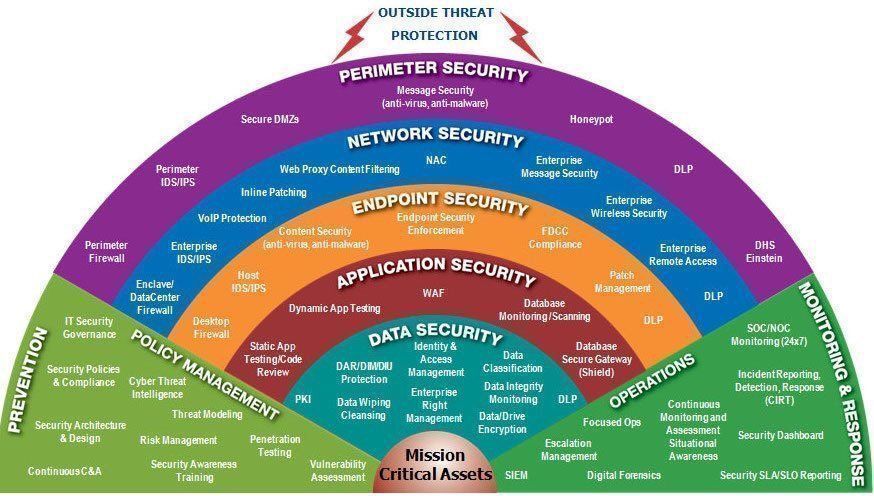 Image via KnowBe4 Blog
Defense in depth — also called layered defense or, less formally, onion defense — is the design assumption that any single control will eventually fail, so protection must come from independent, overlapping layers. The canonical layering from the outside in:
- Policies, procedures, awareness — the administrative shell that defines what everyone below it is supposed to do.
- Physical security — if an attacker can walk up to the hardware, most logical controls become negotiable.
- Network — segmentation, firewalls, IDS/IPS, encrypted transport.
- Server / host — hardening, patching, endpoint protection, host firewalls.
- Application — secure development, input validation, authentication and session handling.
- Data — the innermost layer: encryption, DLP, access controls on the data itself.
Two properties make layering actually work rather than just look good on a slide. First, the layers should be diverse — two firewalls from the same vendor with the same ruleset are one layer wearing two hats. Second, each layer should assume the ones outside it are already compromised. That second assumption is essentially the intellectual ancestor of zero trust: stop treating network location as an authentication factor.
Laws and Regulations
The CISSP is a US-centric exam, and the legal material reflects that. What matters for practice — and for exam questions — is recognizing which legal regime a scenario falls under, because the burden of proof, the victim, and the consequences differ:
- Criminal law — society itself is considered the victim; the state prosecutes. The standard of proof is high (“beyond a reasonable doubt”) and punishments include incarceration, fines, and in extreme jurisdictions capital punishment. Computer crime prosecutions (CFAA cases, for example) live here.
- Civil law (tort law) — the victim is an individual, group, or organization, and the remedy is financial: damages. The standard of proof is lower (“preponderance of the evidence”), which is why organizations that escape criminal liability can still lose civil suits over the same incident — negligence claims after a breach are the classic case.
- Administrative law (regulatory law) — rules enacted by government agencies under authority delegated by legislation. HIPAA’s Security and Privacy Rules are the standing example: the statute sets the mandate, the regulator (HHS) writes and enforces the operational rules.
- Private regulation — compliance obligations created by contract rather than by any legislature. PCI-DSS is the archetype: violate it and no government agency comes after you, but the card brands can fine you, raise your transaction costs, or cut you off from processing entirely — which for a merchant is arguably worse.
Notable US Laws (Overview)
A quick placement list — the privacy-relevant ones get fuller treatment in the Privacy section below:
- CFAA — Computer Fraud and Abuse Act; the primary US anti-hacking statute.
- FISMA — Federal Information Security Management Act; mandates security programs for federal agencies (and drives the NIST SP 800 series’ authority).
- COPPA — Children’s Online Privacy Protection Act; constraints on collecting data from children under 13.
- GLBA — Gramm-Leach-Bliley Act; financial institutions.
- PATRIOT Act — expanded law enforcement surveillance powers post-2001.
- FERPA — Family Educational Rights and Privacy Act; student education records.
Liability
Liability questions reduce to three deceptively simple prompts: who is held accountable, who is to blame, and who pays? For security professionals, the important pattern is that liability tends to roll upward: senior management remains accountable for security outcomes even when execution was delegated, and “we outsourced it” does not transfer accountability to the vendor — you can outsource work, not responsibility. The mechanism courts use to decide whether an organization is liable is the due diligence / due care pair.
Due Diligence / Due Care
These two are easily conflated, and the exam loves the distinction:
- Due diligence is the research and understanding side: investigating risks, evaluating vendors, studying applicable regulations, identifying what protections a prudent organization in your position would have. It’s knowing what you should be doing.
- Due care is the acting side: actually implementing the protections your diligence identified — deploying the controls, fixing the bugs, running the program. It’s doing what you should be doing.
Mnemonic that survives contact with exam pressure: due diligence is thinking/researching, due care is doing. An organization that produced a beautiful risk assessment and then implemented none of it has done due diligence and failed due care — which is arguably worse in litigation than never having assessed at all, because now there’s a paper trail proving they knew.
Negligence
Negligence is the legal opposite of due care. The practical consequence: if you exercised due care — you implemented the protections a reasonable, prudent organization would have — you are generally not liable when an incident happens anyway. If you did not, you most likely are. This is why “reasonable security” documentation matters: it’s not bureaucratic theater, it’s the evidentiary basis for the due-care defense.
Evidence
Evidence handling is where security operations meets the courtroom. The categories matter because they determine how much weight evidence carries and whether it’s admissible at all.
Types of Evidence
Real evidence is the physical object itself — the hard drive, the laptop, the USB stick. Note the subtlety: the drive is real evidence; the data on it is not, which is why digital evidence needs the additional handling rules below.
Direct evidence is testimony from a witness based on their own senses — what they personally saw, heard, or did. It proves a fact on its own, without requiring inference.
Circumstantial evidence supports a conclusion by inference: it establishes circumstances from which a fact can be reasonably deduced, but doesn’t prove the fact directly. A login from the suspect’s workstation is circumstantial — it suggests, but doesn’t prove, that the suspect was at the keyboard.
Corroborative evidence doesn’t stand alone at all; its job is to support and strengthen other evidence already presented — a second log source confirming the same timeline, for example.
Hearsay is secondhand knowledge — anything the witness didn’t perceive directly. The critical point for our field: log files are traditionally considered hearsay, because no human witnessed the events they record. They become admissible under the business-records exception when they’re generated automatically, in the normal course of business, near the time of the event — which is precisely why log pipeline integrity, retention policy, and consistent collection practices have legal weight, not just operational value.
Secondary evidence covers copies, logs, and documents — evidence that stands in for something more original. Most of what a forensic team actually presents is secondary evidence.
Best Evidence Rule
Courts prefer the most original, most reliable form of evidence available — real and direct evidence over copies and inference. Whatever is presented should be accurate, complete, relevant, authentic, and convincing. Those five adjectives are worth memorizing as a set; they double as a quality checklist for any forensic report.
Evidence Integrity
Digital evidence is trivially alterable, so its integrity must be provable. Standard practice: cryptographically hash the original before analysis begins, work exclusively on a forensic copy, and hash both original and copy again after analysis. Matching hashes across the whole chain demonstrate that neither the original nor the working copy was modified. Without this, opposing counsel’s first move is to argue the evidence could have been tampered with — and they’d be right to.
Chain of Custody
Chain of custody is the documented, unbroken record answering four questions at every point in the evidence’s life: Who handled it? When did they handle it? What did they do with it? Where did they handle it? A single undocumented gap — an evidence bag that sat unsigned-for over a weekend — can render everything downstream inadmissible. Operationally this means evidence lockers, signed transfer logs, and the discipline to treat every incident as if it might end up in court, because you rarely know at collection time which ones will.
Reasonable Searches
The Fourth Amendment protects US citizens against unreasonable search and seizure by the government; courts determine after the fact whether evidence was obtained legally, and illegally obtained evidence gets excluded. For private employers the constitutional bar doesn’t apply directly, but the corporate equivalent does: employees must be made aware that their activity on company systems is monitored — via policy, login banners, and signed acknowledgments. That awareness eliminates the reasonable expectation of privacy that would otherwise make workplace monitoring evidence contestable.
Entrapment and Enticement
A pair that exam questions like to blur:
- Entrapment (illegal/unethical): persuading someone to commit a crime they had no prior intention of committing, then charging them with it. Evidence gathered this way is a defense for the accused.
- Enticement (legal/ethical): making a crime more attractive to someone who has already decided to commit one — you’re shaping where the attack lands, not creating the intent. Honeypots are enticement: the attacker was already intruding; the honeypot just gave them a tempting, instrumented target.
The line is intent: who created it. If the intent originated with the attacker, it’s enticement and you’re fine. If it originated with you, it’s entrapment.
Intellectual Property
Four protection regimes, each with its own registration model, lifetime, and characteristic attack:
- Copyright protects the expression of an idea (code, text, media) — not the idea itself. Granted automatically upon creation, lasting (in the US) 70 years after the creator’s death. The characteristic attack is piracy / infringement.
- Trademark protects brand identifiers — names, logos, slogans. Must be registered, with 10-year terms that are renewable indefinitely as long as the mark stays in use. The characteristic attack is counterfeiting.
- Patents protect inventions that are new, useful, and non-obvious, in exchange for public disclosure. 20 years from filing, no renewal. The characteristic attack is infringement.
- Trade secrets protect confidential business information (formulas, algorithms, processes) for an unlimited duration — but only as long as the organization actively keeps them secret through NDAs, access controls, and need-to-know. There is no registration and no protection once the secret is out; the characteristic attack is espionage. The strategic trade-off versus patents: a patent gives you 20 enforceable years and then it’s public; a trade secret can last forever but offers no recourse if independently discovered or reverse-engineered.
Privacy
The privacy landscape is a patchwork of sector-specific US laws plus the EU’s comprehensive approach. Knowing which law applies to which data type and which industry is most of the battle:
- HIPAA (Health Insurance Portability and Accountability Act) — strict privacy and security rules for handling protected health information (PHI). Applies to covered entities (providers, insurers, clearinghouses) and, via business associate agreements, to their service providers.
- Security breach notification laws — in the US these are state-by-state, with no single federal standard. Timelines, thresholds, and definitions of “personal information” vary, which turns multi-state breach response into a legal mapping exercise before it’s a technical one.
- ECPA (Electronic Communications Privacy Act) — protects against warrantless wiretapping and interception of electronic communications.
- PATRIOT Act (2001) — expanded law enforcement’s electronic monitoring capabilities and permitted search and seizure without immediate disclosure to the target (delayed-notice or “sneak and peek” warrants). Effectively weakened several ECPA protections.
- CFAA (Computer Fraud and Abuse Act) — the statute most frequently used to prosecute computer criminals in the US; criminalizes unauthorized access and exceeding authorized access to protected computers.
- GLBA (Gramm-Leach-Bliley Act) — applies to financial institutions; requires safeguarding of customer financial data and disclosure of information-sharing practices.
- SOX (Sarbanes-Oxley Act) — financial reporting integrity for publicly traded companies; its IT relevance comes from the internal-controls requirements over systems that feed financial reporting.
- PCI-DSS — contractual, not law (see Private Regulation above), but functionally a privacy/security regime for cardholder data.
GDPR — General Data Protection Regulation
The GDPR deserves its own subsection because of its extraterritorial reach: if you process data of people in the EU, it applies to you, regardless of where your organization sits. Enforcement is backed by fines of up to €20 million or 4% of annual worldwide turnover, whichever is higher — numbers designed to get board-level attention.
The core obligations and rights:
- Right of access — data subjects can demand a free copy of the personal data you hold about them, and you must be able to produce it.
- Right to erasure (“right to be forgotten”) — subjects can require deletion of their data when there’s no overriding legitimate ground to keep it. Architecturally painful if personal data is scattered across backups, data lakes, and third parties — which is the point.
- Data portability — data must be exportable in a structured, commonly used electronic format so subjects can take it elsewhere.
- Breach notification — the supervisory authority must be notified within 72 hours of becoming aware of a breach. Compare that deadline against a typical incident response timeline and it becomes clear why detection capability and pre-drafted notification processes are compliance requirements, not nice-to-haves.
- Privacy by design — collect and process only the data that is absolutely necessary for the purpose (data minimization), and build protection in from the start rather than bolting it on.
- Data protection officers — required for organizations whose core activities involve large-scale processing or monitoring; an internal, independent oversight role.
- Restrictions on lawful interception — member-state surveillance carve-outs exist but are bounded.
Legacy Frameworks (EU–US Data Transfers)
Three superseded regimes worth recognizing by name because older documentation still references them: the EU Data Protection Directive (the GDPR’s predecessor, a directive rather than a directly binding regulation), EU-US Safe Harbor (invalidated by the CJEU in Schrems I, 2015), and Privacy Shield (its replacement, invalidated in turn by Schrems II, 2020). The recurring lesson: EU–US transfer mechanisms keep getting struck down over US surveillance law, so architectures that depend on a single transfer mechanism carry structural legal risk.
International Agreements
OECD Privacy Principles
The OECD’s eight privacy principles (1980, revised 2013) predate and heavily influenced essentially every modern privacy law, GDPR included. They’re the conceptual skeleton underneath the statutes:
- Collection limitation — collect personal data lawfully, fairly, and with knowledge or consent of the subject.
- Data quality — data should be relevant to its purpose, accurate, complete, and current.
- Purpose specification — state the purpose at collection time; don’t quietly repurpose later.
- Use limitation — don’t use or disclose data beyond the specified purposes without consent or legal authority.
- Security safeguards — protect data with reasonable controls against loss, unauthorized access, modification, and disclosure. (This principle is where the entire information security profession plugs into privacy law.)
- Openness — be transparent about data practices, policies, and the identity of the data controller.
- Individual participation — individuals can find out what data is held about them, access it, and have it corrected or erased.
- Accountability — the data controller is accountable for complying with all of the above.
If you can recognize which principle a GDPR article implements, the GDPR stops looking like an arbitrary rulebook and starts looking like an enforcement layer on a forty-year-old consensus.
Information Security Governance Hierarchy
A security program hangs off the organization’s strategic hierarchy. From the top down:
- Values — ethics, principles, beliefs; the non-negotiables that constrain everything below.
- Vision — hope and ambition; where the organization wants to be.
- Mission — motivation and purpose; why the organization exists.
- Strategic objectives — the plans, work, and sequencing that operationalize the mission.
- Actions & KPIs — concrete actions with resources, expected outcomes, owners, and timeframes.
The practical use of this hierarchy: when a security initiative can’t be traced upward to a strategic objective and ultimately to the mission, it will lose every budget fight — correctly, because nobody can articulate why it exists.
Planning Horizons
Each organizational layer plans on its own horizon:
- Governance owns the strategic plan — 3 to 5 years out, direction-setting.
- Management owns the tactical plan — roughly 1 year, translating strategy into projects and budgets.
- Staff owns the operational plan — high detail, updated frequently, describing how the work actually gets done day to day.
Policy Document Hierarchy
The document types that carry a security program, and how they differ. The two axes that matter: strategic vs. tactical, and mandatory vs. recommended.
- Policies — strategic, mandatory. High-level, deliberately non-specific general management statements: “all sensitive data must be encrypted in transit and at rest.” Policies state what and why, never how — which is what lets them survive technology changes without constant revision.
- Standards — tactical, mandatory. Specific mandatory controls for specific uses: “TLS 1.3 for all external interfaces; AES-256-GCM for data at rest.” Standards are where policy meets concrete technology choices.
- Procedures — tactical, mandatory. Low-level, step-by-step instructions for performing a task: the runbook. If two people follow the same procedure and get different results, the procedure is broken.
- Baselines — tactical, mandatory. The minimum acceptable security configuration for a platform or system class — hardening baselines like the CIS Benchmarks are the canonical example. Systems may exceed the baseline, never fall below it.
- Guidelines — tactical, non-mandatory. Recommendations and best practices for situations the mandatory documents don’t cover. The only optional document type in the stack — an exam favorite for exactly that reason.
Personnel Security
People are simultaneously the most important control and the most common failure point, so the program needs to address the full employment lifecycle:
- Awareness aims to change behavior — it’s not about transferring deep knowledge but about making secure behavior the default reflex: recognizing phishing, locking screens, reporting incidents without fear. Awareness that doesn’t measurably change behavior is compliance theater.
- Training gives users a specific skillset — role-based and deeper than awareness: secure coding for developers, incident handling for the SOC, data handling for HR. The distinction (awareness = behavior, training = skills) shows up on the exam.
- Hiring practices — background checks proportionate to the sensitivity of the role, and NDAs signed before access to anything confidential. The cheapest security control is not hiring the problem in the first place.
- Employee termination process — the mirror image of onboarding, executed promptly and completely: access revoked at or before notification, assets recovered, NDA obligations reaffirmed in the exit conversation. Orphaned accounts from sloppy offboarding are a perennial audit finding and a genuinely common breach vector.
Access Control Categories
Controls are classified along two independent dimensions: how they’re implemented (the category) and what effect they have (the type). The categories:
Administrative Controls
Controls implemented through people and process: policies, regulations, training, background checks, separation of duties, mandatory vacations. Within any category, controls can serve different functions — preventive (stop the incident), detective (notice it), corrective (fix the immediate damage), recovery (restore to normal operation), deterrent (discourage the attempt), and compensating (an alternative control standing in where the primary control isn’t feasible). Exam questions routinely ask you to classify a control along both dimensions — e.g. a security-awareness program is administrative-preventive; reviewing audit logs is administrative-detective.
Technical (Logical) Controls
Controls implemented in hardware and software: firewalls, ACLs, encryption, IDS/IPS, authentication systems. The same functional types apply — an IPS is technical-preventive, an IDS technical-detective, a backup-restore process technical-recovery.
Physical Controls
Controls that protect the physical environment: locks, fences, guards, mantraps, cameras, environmental controls. Easy to deprioritize in cloud-heavy thinking, but the layering model above is explicit about why that’s a mistake: physical access trumps most logical controls.
Risk Management
Risk management is the largest block in Domain 1 and the conceptual core of the whole certification: security decisions are risk decisions, and everything else is implementation detail.
The foundational relationships:
- Risk = Threat × Vulnerability — risk only exists where both are present. A threat with no matching vulnerability (an exploit for software you don’t run) produces no risk; a vulnerability with no threat actor interested in it is likewise academic. Impact can be multiplied in as a third factor to complete the picture: Risk = Threat × Vulnerability × Impact.
- Total Risk = Threat × Vulnerability × Asset Value — the exposure before any countermeasures are applied.
- Residual Risk = Total Risk − Countermeasures — what remains after controls. Residual risk never reaches zero; the goal is to drive it below the organization’s risk appetite, at which point the remainder is formally accepted.
The process is a cycle, not a project: IT risk identification → risk assessment → response and mitigation → risk and control monitoring → back to identification. Threats evolve, assets change, controls decay — a risk register that was accurate a year ago is a historical document. NIST SP 800-37r2 formalizes this cycle as the Risk Management Framework (RMF) — prepare, categorize, select, implement, assess, authorize, monitor — the process behind Domain 2’s certification/accreditation pair.
Building the Risk Management Team
Before assessing anything, establish the frame: the scope (which assets, systems, business units), the methods (quantitative, qualitative, or hybrid), the tools, and — critically — what constitutes acceptable risk, anchored in the organization’s risk appetite. Skipping this framing step produces assessments whose findings nobody has agreed in advance to act on.
Assets
Assets divide into tangible (physical things — buildings, hardware, infrastructure) and intangible (data, trade secrets, reputation, brand). Intangibles are harder to value and routinely dominate the actual loss in an incident: the servers in a breach are worth a few thousand euros; the customer data and the trust are worth the lawsuit.
Risk Assessment: Quantitative vs. Qualitative
Quantitative analysis expresses risk in money, which makes it the language executives can act on. The canonical six-step process:
- Inventory assets and assign each an asset value (AV).
- Identify threats per asset; for each threat, determine the exposure factor (EF) and calculate the single loss expectancy (SLE).
- Perform threat analysis to estimate how often each threat materializes per year — the annualized rate of occurrence (ARO).
- Derive overall loss potential by calculating the annualized loss expectancy (ALE).
- Research countermeasures (safeguards) for each threat, then recalculate ARO and ALE assuming the safeguard is in place.
- Perform a cost/benefit analysis for each safeguard against each threat: does the reduction in ALE justify the safeguard’s cost?
Qualitative analysis answers “how bad?” using scales (low/medium/high, 1–5) and expert judgment rather than currency. Faster, cheaper, and better suited to risks that resist honest quantification — what exactly is the ARO of a novel supply-chain attack? — at the cost of precision and comparability. Real programs blend both: qualitative triage across the estate, quantitative deep-dives where the numbers justify the effort.
Risk Response Options
Once assessed, every risk gets exactly one of these responses:
- Mitigation — reduce likelihood or impact through controls.
- Transference — shift the financial consequence to another party (insurance, contracts). Note: you transfer the cost, never the accountability.
- Acceptance — formally, in writing, by someone with the authority to accept it. Doing nothing after documented consideration is a legitimate response.
- Avoidance — eliminate the activity that creates the risk entirely.
What is never legitimate is rejecting a risk — pretending it doesn’t exist. Undocumented, unconsidered risk is precisely the negligence scenario from the legal section: an incident plus evidence that the risk was knowable equals liability.
Countermeasures themselves need periodic reassessment: are the current controls good enough, do they need improvement, or do we need new ones? Controls decay as the environment changes around them.
Quantitative Formulas
The working vocabulary, with the questions each value answers:
- Asset Value (AV) — what is the asset worth?
- Exposure Factor (EF) — what percentage of the asset is lost when the threat materializes once?
- Single Loss Expectancy (SLE = AV × EF) — what does one occurrence cost?
- Annualized Rate of Occurrence (ARO) — how many times per year will it happen?
- Annualized Loss Expectancy (ALE = SLE × ARO) — what does this risk cost per year if we do nothing?
- Total Cost of Ownership (TCO) — the full mitigation cost: upfront plus ongoing.
| Concept | Formula |
|---|---|
| Exposure factor (EF) | % |
| Single loss expectancy | SLE = AV × EF |
| Annualized rate of occurrence | # / year |
| Annualized loss expectancy | ALE = SLE × ARO or ALE = (AV × EF) × ARO |
| Annual cost of the safeguard (ACS) | $ / year |
| Value of benefit of a safeguard | (ALE1 − ALE2) − ACS |
The safeguard-value formula is the one that decides budget fights: ALE1 is the annualized loss before the safeguard, ALE2 after, and ACS is what the safeguard costs per year. If (ALE1 − ALE2) − ACS is positive, the safeguard pays for itself; if negative, you are — in purely financial terms — spending more on the lock than the door is worth. Worked example: an asset worth €100k with an EF of 30% gives an SLE of €30k; at an ARO of 0.5 (once every two years), ALE1 = €15k/year. A safeguard costing €5k/year that cuts the ARO to 0.1 yields ALE2 = €3k, so the benefit is (15k − 3k) − 5k = €7k/year in favor of deploying it.
Qualitative Risk Analysis Matrix — NIST.SP.800-30r1
The standard tool of qualitative analysis is the likelihood-versus-consequences matrix: rate each risk on both axes, and the cell where they intersect assigns the priority. NIST SP 800-30 is the reference methodology.
| Likelihood (X) / Consequences (Y) | Insignificant | Minor | Moderate | Major | Catastrophic |
|---|---|---|---|---|---|
| Almost Certain | High | High | Extreme | Extreme | Extreme |
| Likely | Minor | High | High | Extreme | Extreme |
| Possible | Low | Minor | High | High | Extreme |
| Unlikely | Low | Low | Minor | High | Extreme |
| Rare | Low | Low | Minor | High | High |
The matrix’s weakness is worth stating openly: both axes are judgment calls, so two assessors can rate the same risk into different cells. Its strength is that it forces those judgments to be made explicitly and comparably, instead of living in individual heads.
The risk register is where the outputs land — the living document tracking every identified risk with its probability, impact, chosen mitigation, cost, post-mitigation risk score, owner, and deadline:
| Category | Name | Risk # | Probability | Impact | Mitigation | Cost | Risk Score after Mitigation | Action by | Action When |
|---|---|---|---|---|---|---|---|---|---|
The two columns that make a register useful rather than decorative are the last two: every risk has a named owner and a date. A risk without an owner is a risk nobody is managing.
Risk Control and Monitoring
Three indicator families keep the program measurable:
- Key Goal Indicators (KGI) tell management whether an IT process has achieved its business goals — backward-looking, outcome-focused: did we get there?
- Key Performance Indicators (KPI) measure how well we’re performing along the way — are we on track? Patch SLA compliance, mean time to detect, control coverage.
- Key Risk Indicators (KRI) are the forward-looking family: how risky is a given activity, and how much aggregate risk is the organization carrying? Rising KRIs are the early-warning system that should trigger reassessment before the risk materializes.
Risk Management Maturity Model
Risk management capability matures through the familiar five CMM-style levels: Level 1 (Initial) — ad hoc, hero-driven; Level 2 (Repeatable) — processes exist but depend on individuals; Level 3 (Defined) — documented and standardized organization-wide; Level 4 (Managed) — quantitatively measured and controlled; Level 5 (Optimizing) — continuous, data-driven improvement.
The ingredients that move an organization up the ladder: executive sponsorship, systematic risk identification and analysis, planned risk responses, integration of risk management with project management (so risk is considered when decisions are made, not audited afterwards), and — hardest of all — genuine trust in and a culture of risk management, where reporting a risk is rewarded rather than punished.
Threat Actors and Attack Types
A quick taxonomy of who’s on the other side, because the actor determines the sophistication, persistence, and motivation you’re defending against:
- Script kiddies — low skill, using others’ tools; dangerous mainly through volume and indiscriminateness.
- White / gray / black hat hackers — distinguished by authorization and intent: white hats operate with permission, black hats without, gray hats without permission but (self-described) without malice — which is still illegal.
- Internal vs. external threats — insiders start with legitimate access, knowledge of the environment, and implicit trust, which is why insider incidents are disproportionately damaging relative to their frequency.
- Hacktivists and governments — ideologically and politically motivated respectively; state actors bring effectively unlimited patience and budget (APT territory).
- Bots and botnets — automation as a threat multiplier: DDoS, credential stuffing, spam at scale.
- Phishing / social engineering — the attack that routes around every technical control by targeting the human layer; consistently the most common initial access vector, which loops back to why awareness programs target behavior.
NIST Cybersecurity Framework (Rev 1.1)
The NIST CSF (framework document) organizes an entire security program into five functions: Identify → Protect → Detect → Respond → Recover. Its value is less in novelty than in shared vocabulary — it gives executives, auditors, and engineers one map of the program, and it makes gaps visible: plenty of organizations are heavily invested in Protect while Detect and Respond are skeletal, a shape the CSF exposes immediately. (Rev 2.0 later added a sixth function, Govern, wrapping around the original five — consistent with everything this domain says about governance.)
Business Continuity Planning — NIST.SP.800-34r1
Business continuity planning ensures the organization can keep its critical functions running through and after a disruption. NIST SP 800-34 is the reference. The BCP is an umbrella containing several subordinate plans, each with a distinct scope:
- COOP (Continuity of Operations Plan) — sustaining essential functions at an alternate site, typically for up to 30 days.
- Crisis Communication Plan — who says what to whom during the event: employees, customers, regulators, press. Getting this wrong compounds the technical incident with a reputational one.
- Critical Infrastructure Contingency Plan — continuity for the infrastructure components critical operations depend on.
- Occupant Emergency Plan — the people-first plan: evacuation and safety procedures. Human life always outranks system recovery, on the exam and in reality.
The plan itself follows a lifecycle — Analysis → Solution Design → Implementation → Test & Acceptance → Maintenance — and the overall program runs as a project: Project initiation (with senior management) → Scope the project → Business Impact Analysis → Identify preventive controls → Recovery strategy → Plan design and development → Implementation, training, and testing → BCP/DRP maintenance (with senior management).
Note that senior management bookends the process. Their involvement at initiation isn’t ceremonial: without executive sponsorship the BIA won’t get honest answers from business units, and without ongoing sponsorship the plan rots on a shelf. An untested, unmaintained BCP is a false sense of security with a table of contents.
Business Impact Analysis
The BIA is the analytical heart of continuity planning: it identifies which functions are critical — where disruption is simply not acceptable — and quantifies how quickly and completely each must be recovered. Criticality can also be imposed externally by law or regulation, regardless of what the business would choose on its own.
For each critical system, function, or activity, the BIA assigns recovery values:
- Recovery Point Objective (RPO) — the maximum acceptable data loss, expressed as time. An RPO of four hours means backup/replication must guarantee you never lose more than four hours of data. RPO drives backup frequency and replication architecture.
- Recovery Time Objective (RTO) — the target time to restore the system (hardware/platform) after the disruption.
- Work Recovery Time (WRT) — the time after system restoration needed to configure and validate the software and business function on top of it — restoring data, testing, resuming actual work. The often-forgotten half of recovery.
- Maximum Tolerable Downtime (MTD) — the total outage duration the business can survive for this function. The governing relationship: MTD ≥ RTO + WRT. If system rebuild plus work recovery exceeds the MTD, the recovery strategy is inadequate by definition and must be redesigned — faster recovery, more redundancy, or a different architecture.
- MTBF (Mean Time Between Failures) — expected operating time between failures of a component; a reliability input for choosing hardware and redundancy levels.
- MTTR (Mean Time To Repair) — average time to fix a failed component; feeds directly into whether the RTO is realistic.
- MOR (Minimum Operating Requirements) — the minimum resources (systems, connectivity, staff, facilities) a critical function needs to operate at all: the specification for what an alternate site or degraded mode must actually provide.
The practical use of these numbers: they turn continuity from opinion into arithmetic. When a business owner claims a function can’t be down for more than an hour but has only funded nightly backups, the BIA is where that contradiction surfaces — RPO of 24 hours, demanded MTD of one — and gets escalated as a conscious risk decision instead of being discovered during the outage.
Erstellt: 2026-07-07 — ausformulierte Fassung der Original-Stichpunkte, siehe Domain 1 - Security and Risk Management (Original-Stichpunkte)